
Log in
How to accept payments online safely and easily
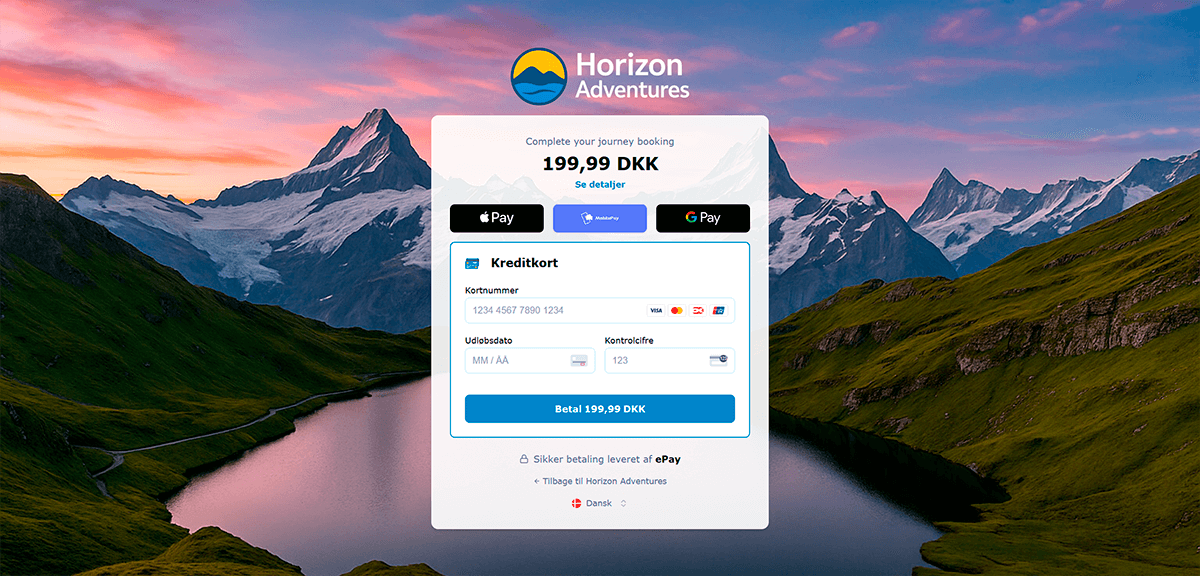
At ePay, you can choose the integration method that best fits your business.
Choose Checkout – the most flexible payment window on the market. ePay Checkout is designed to adapt to your business and your needs, giving you a professional and user-friendly payment experience without hassle. It’s easy to set up, requires minimal technical knowledge, and is perfect if you want to get started quickly – without compromising on functionality or design.
Or go with Blocks – our fully integrated payment solution, where you can embed payment methods such as card payments and wallet options directly on your own website. With Blocks, you gain full control over the design, creating a seamless checkout experience that matches your brand identity from start to finish.
But what does the engine actually do – and what happens when the customer clicks “buy”?
In that moment, a series of technical processes begin: data is encrypted, authorized, and approved – all within seconds. For you as a webshop owner, it should just work – securely, smoothly, and without worries.
This guide gives you a complete overview of how a payment gateway works, how it differs from an acquirer, and how to choose the solution that best fits your business.
A payment gateway is the digital equivalent of the card terminal in a physical store. It’s the system that handles the actual payment when a customer enters their card details in your webshop.
The gateway ensures that the data is securely sent to the acquirer, who transfers the money from the customer’s account to your company’s account. Without a payment gateway, your webshop wouldn’t be able to accept card payments online.
In short:
A payment gateway acts as the link between your website, the customer, and the bank – enabling secure payments in just a few seconds.
When choosing a payment gateway, there are five things you should always look for. These separate a reliable solution from one that may cause problems later on.
A good payment gateway makes the payment process invisible to the customer – everything just works.
A payment gateway and an acquirer are two completely different things – but the payment industry is often complex and confusing, especially for new business owners.
“Do I need Nets to accept payments?”
“Is an acquirer necessary?”
“Can’t I just use ePay?”
“What am I paying the acquirer for – and why do I also need ePay?”
We get these questions – and hundreds of variations of them – every day at the ePay office.
And while we love talking on the phone, we also see the need for a clear explanation of what a payment gateway and an acquirer actually do.
When you accept online payments, there are usually two parties involved (besides you and your customer): your acquirer and your payment gateway.
Each has its own role:
Your acquirer
Your acquirer is a bank that transfers the money from your customer’s account to your own. It’s also the acquirer who approves your business to accept card payments. That approval is called an acquiring agreement.
Your payment gateway
Your payment gateway provides the page where your customer enters their card details and handles the communication between your website and your acquirer. In short, the payment gateway works just like a card terminal in a store.
👉 For the customer, the purchase is finished – but the payment process has just begun.
When a customer completes a purchase, your payment gateway communicates with your acquirer. The acquirer checks that the card is valid and reserves the amount. The payment is now authorized.
When you’re ready to ship the product, you can capture the payment – either directly in your webshop system or by logging in to your payment gateway’s administration.
If you sell a product that the customer receives immediately, you can capture the payment at the same time it’s authorized – this is called instant capture.
When you capture a payment, the gateway notifies the acquirer to transfer the money. It can take several days before the funds reach your account – depending on your acquirer and the card type used.
If the authorization fails, the payment is declined. Common reasons include:
In ePay’s back office, you can see declined payments under Transactions, where a specific error code explains why the payment failed.
If necessary, you may need to contact your acquirer for more details, since they handle the actual card validation.
As mentioned, the payment gateway provides the payment page (where the customer enters card details) on your webshop. A payment gateway is also called a PSP – Payment Service Provider.
In short, it handles card data on your behalf and sends the transaction information to the acquirer, who validates the card and later transfers the money.
Because card data is highly sensitive, a payment gateway must comply with strict PCI security standards and be regularly approved by Visa and Mastercard.
A payment gateway does:
A payment gateway does not:
Everything that happens up to the point of capturing a payment is handled by your gateway. Everything after that is handled by your acquirer.
An acquirer is a bank that approves your business to accept online card payments and transfers the money from your customers to you.
To accept payments, you need a valid acquiring agreement. This agreement determines which card types you can accept.
You must meet certain requirements before an acquirer approves your business. For example, according to Nets’ guidelines, your website must clearly display:
There are several acquirers to choose from.
For example, Nets is the only one that can offer Dankort agreements, while there are multiple options for international cards.
Before choosing, you should consider two things:
If you’re just starting out and want to keep costs low, you can choose a wallet solution (such as PayPal) instead of a traditional acquirer agreement.
Advantages:
Disadvantages:
Wallet solutions can be great for new webshops testing the market – but if you want to appear professional and trustworthy, you should have agreements with acquirers so you can display the logos for Dankort, Visa, and Mastercard on your site.
Contact your acquirer when it concerns:
Contact your payment gateway when it concerns:


