
Refunds in your webshop: how it works


A customer has returned a pair of boots. The parcel arrived on Monday, you refunded the payment that same afternoon, and on Thursday she writes: "Where's my money?"
You did everything right. The money just hasn't arrived yet, and it's an email most webshops know all too well. Here are the three ways to refund, what happens afterwards, and what to do when a refund doesn't go through.
Has the payment been captured? Then you refund
A refund sends back money that has already been taken from the customer's account. That's why you can only refund a payment that has been captured.
If you haven't captured it yet because the item was never shipped, you void the payment instead. This releases the authorisation, and no money moves in either direction. The customer's bank decides when the reserved amount disappears from the customer's account. Some banks release it quickly, while others leave the hold in place until it expires on its own, which can take up to 30 days.
How to refund
There are three ways, and they all end up in the same place.
From Backoffice. Find the payment in the transaction list and refund it directly from there. You can refund the full amount or just part of it, for example if the customer has returned two of three items.

Refund the full amount or part of it directly from the transaction. You can also capture and void from the same place.
If you're still on ePay Classic, you do the same in the old backoffice. Find the payment under Payments > Captured payments, click Info and credit it at the bottom of the page. If you only need to refund part of the amount, change the amount in the field first.
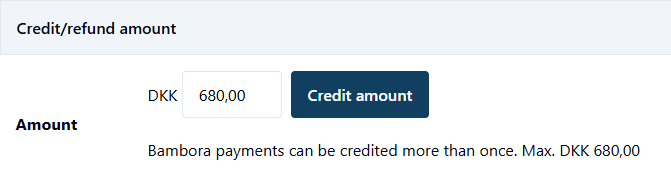
Classic: Refund the full amount or part of it directly from the transaction.
From your own integration. If you've connected ePay to your e-commerce platform, you can refund directly from the order in your webshop, and the refund is passed on to ePay automatically. The advantage is that the order and the payment stay in sync, without you having to make changes in two places.
Via the API. If you've built your own solution, or you want your customer service system to refund automatically, for example, use the Refund Payment endpoint in our API. Partial refunds are supported, and you'll find the details in the documentation. On Classic, the function is called credit.
When will the customer see the money?
Once you've refunded, the amount goes on to the acquirer, through the card network and finally to the customer's bank. The acquirer and the customer's bank decide along the way when the money arrives, and neither you nor we can see or speed up that part. The acquirer Clearhaus, for example, sends all refunds together at 9 pm (Danish time), and after that it's up to the customer's bank to decide when the amount is credited to the account.
- Cards: according to Clearhaus, the whole process can take up to ten days.
- Vipps MobilePay: the money goes to the account the customer has chosen in the app, which isn't necessarily the account the purchase was paid from. According to Vipps MobilePay, the money usually arrives within a couple of working days, but it can take up to ten days, depending on the banks.
One thing isn't up to the bank, though, and that's when you refund. If a customer exercises their right of withdrawal, the Danish Consumer Contracts Act requires you to refund the money without undue delay and no later than 14 days after you've been informed, using the same means of payment the customer used. You are, however, allowed to wait until you've received the item back or the customer has provided proof that it has been sent.
When a refund doesn't go through
The vast majority of refunds go through without anyone giving them a second thought. But now and then one fails, typically for one of two reasons: the card has expired or been blocked, or an error code comes back from the acquirer or the customer's bank.
Start by opening the payment in Backoffice. The event log shows what happened and which code was returned.
If you get an error code that means you can't refund to the card, it's not necessarily the end of the road. The acquirer, for example Nets or Worldline, can sometimes still process the refund.
If that doesn't work, the usual solution is a bank transfer directly to the customer. This requires the customer's express consent, and it must not cost the customer anything. Get the account details in writing, and make a note on the order so it doesn't get refunded twice.
Two things worth knowing
The transaction fee doesn't come back. Nets says so directly in its acquiring terms: the fee on the original payment is not repaid when you refund it. If you have a different acquirer, check your own agreement.
Don't wait too long. A refund can be sent up to 18 months after the payment, but many acquirers reject it after just a year or so. MobilePay has a limit of 365 days.
What do you tell the customer?
The question usually comes three days later. Here's a reply you can copy and adapt:
We sent your refund on [date]. Your bank decides when the amount appears in your account, and it can take up to ten days.
If you paid with MobilePay, the money will go to the account you've chosen in the app. If it hasn't arrived by [date], just write to us again and we'll look into it.
The refund itself takes you less than a minute. It's the wait afterwards that needs explaining to the customer, and that's easier to do in the first email than in the third.


