Everything you need to know about card fees and surcharges as a webshop owner

TL;DR (Too Long; Didn't Read)
You must never add a surcharge to regular consumer cards (Dankort, Visa, Mastercard, etc.) issued in the EU/EEA (European Economic Area).
You are allowed to pass on surcharges for:
Business cards (Danish and international)
American Express or JCB (if you have an agreement)
Cards issued outside the EU/EEA
The surcharge must be clearly stated in both your terms and conditions and at checkout - and you must never charge more than what the acquirer charges you.
What is a card fee?
When a customer pays by card in your webshop, the payment must be processed through an acquirer, such as Worldline or Nets. For each transaction, you as the webshop pay a fee to the acquirer, either as a percentage of the purchase amount or as a fixed amount.
Normally, it is you as the webshop owner who covers this cost, but in some cases you can pass it on to the customer. When the fee is charged to the cardholder, it is typically referred to as a surcharge.
Card fees mean that the customer is not only paying for the product or service itself, but also for the cost associated with processing the card payment.
For example, if a customer buys a product for DKK 1,000 and the acquirer charges a 1.8% fee, the payment costs you DKK 18. If you use surcharging, you can in certain cases add the DKK 18 to the customer's payment, so you are not left covering the cost yourself.
There are two ways to set up your fees: Standard and recursive.
A standard fee is calculated based on the transaction amount itself, so if you add 1.8% to DKK 1,000, the fee comes to DKK 18 and the customer pays DKK 1,018.
A recursive fee is also calculated on the fee itself. This makes the fee slightly higher - 1.8% of DKK 1,000 becomes DKK 18.33 - so the customer pays DKK 1,018.33.
The difference is that the recursive fee ensures you as a business have the entire fee covered, as we calculate what the final fee from the acquirer will be. The standard fee is lower, but easier for the customer to understand.
However, it is not always permitted to add a card fee - it depends on the card type and where it was issued.
When are you allowed to charge a card fee?
If the customer pays with a regular consumer card issued in the EU/EEA, you must never pass the card fee on to the customer.
This applies regardless of whether it is a Dankort, Visa, Mastercard or any other card. This is due to EU payment legislation, which protects consumers against additional costs on card payments.
When the customer pays with a business card / corporate card, you are allowed to pass on the card fee - for both Danish and international cards, as long as they are issued for business use.
This is an important detail, because business cards typically have higher fee rates than consumer cards, and so it can quickly become a strain on your bottom line if you do not pass on the cost.
If you have a direct acquiring agreement with, for example, American Express or JCB, you are allowed to charge card fees on these payments. Remember, however, to make this clearly stated in your terms and conditions.
If a customer pays with a card issued outside the EU/EEA, such as an American or Asian Visa or Mastercard, you are likewise allowed to pass the card fee on to the customer. These transactions fall outside the EU's consumer protection in this area.
Surcharges on Apple Pay and Google Pay
Through our back office, you can easily configure surcharge rules for Apple Pay and Google Pay.
One of the challenges with these payment methods is that neither the webshop nor the payment provider can see which card type the customer is using until the customer has approved the payment directly on their device. This means that in some cases, the webshop only discovers after approval that a business card or a card issued outside the EEA was used - and thus risks having to cover an additional fee.
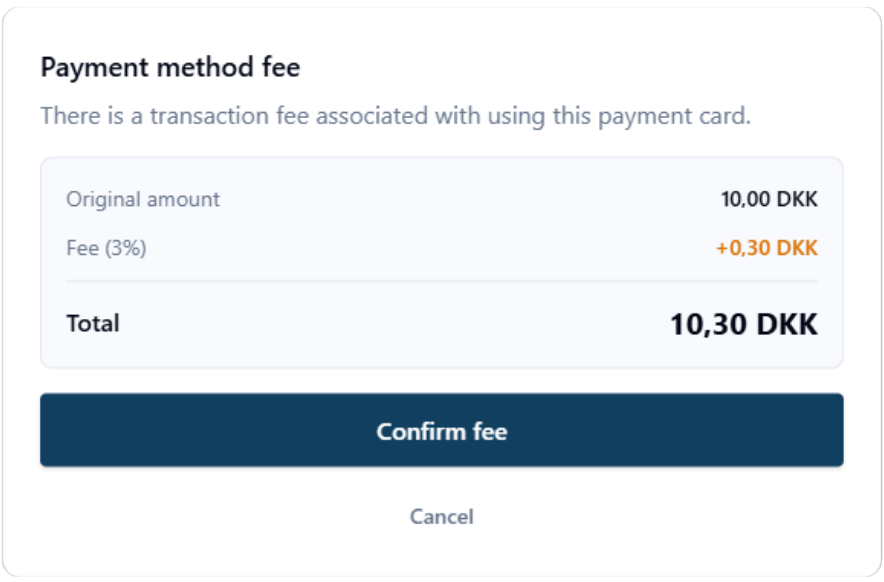
To address this, we have developed an extra approval step in the payment flow. When a surcharge rule is active, the customer - after the initial approval - will be asked to confirm the payment once more if a surcharge has been applied. Only then is the transaction completed.
This allows you to shift the cost from the webshop to the customer in cases where, for example, a business card or a card issued outside the EEA is used - even when the customer pays with Apple Pay or Google Pay.
Requirements for you as a webshop owner
If you use surcharging, there are three fundamental requirements that must always be met:
- Terms and conditions - It must be clearly and explicitly stated when a customer may be charged a card fee. The information must not be hidden in fine print, but must be clearly visible in your terms and conditions.
- No overcharging - You must never charge more than what your acquirer charges you. If the fee is 1.8%, you may not, for example, round up to 2% or add a fixed fee on top.
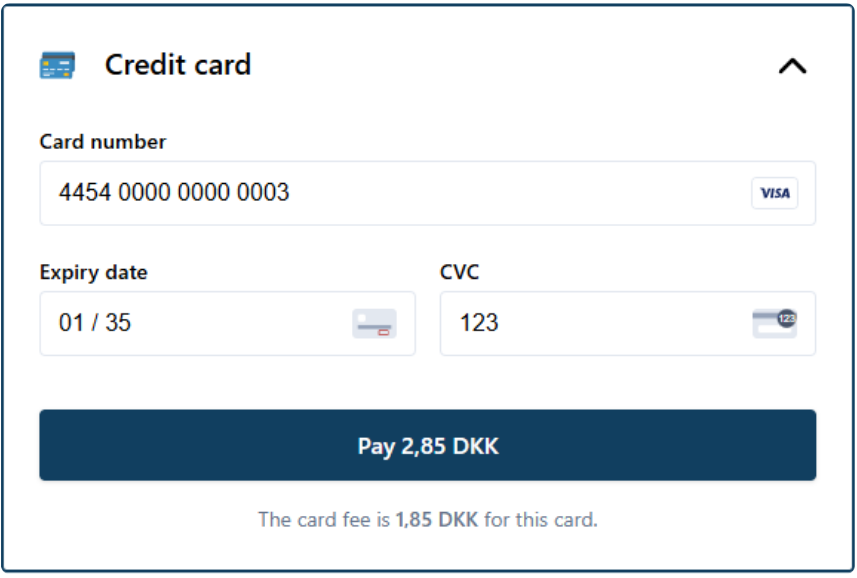
- Visibility at checkout - The card fee must be presented as a separate line in the checkout flow, so the customer can clearly see both the fee and the total amount before the payment is completed. You do not need to worry about this part, as ePay by default always displays both the fee and the total amount in the payment window.
You can read more about disclosure requirements for online commerce here.
Whether surcharging is beneficial for your business depends entirely on your customer base. If the vast majority of your customers are private Danish consumers, surcharging rarely makes sense, as you are not allowed to add fees to most cards.
If, on the other hand, you sell a lot to businesses or international customers, it can be a way to prevent large fees from eating into your profit. The same applies if you sell expensive products, such as travel, where a fee can quickly represent a significant portion of your profit, or if you operate with a very low margin on your products or services.
Setting it up in ePay
At ePay, you can easily set up rules and adjust card fees directly in our back office. The rates follow the rules you have defined yourself, so you can always maintain an overview of fees for different card types. This way, you can easily keep track that you are not charging too much - or too little.
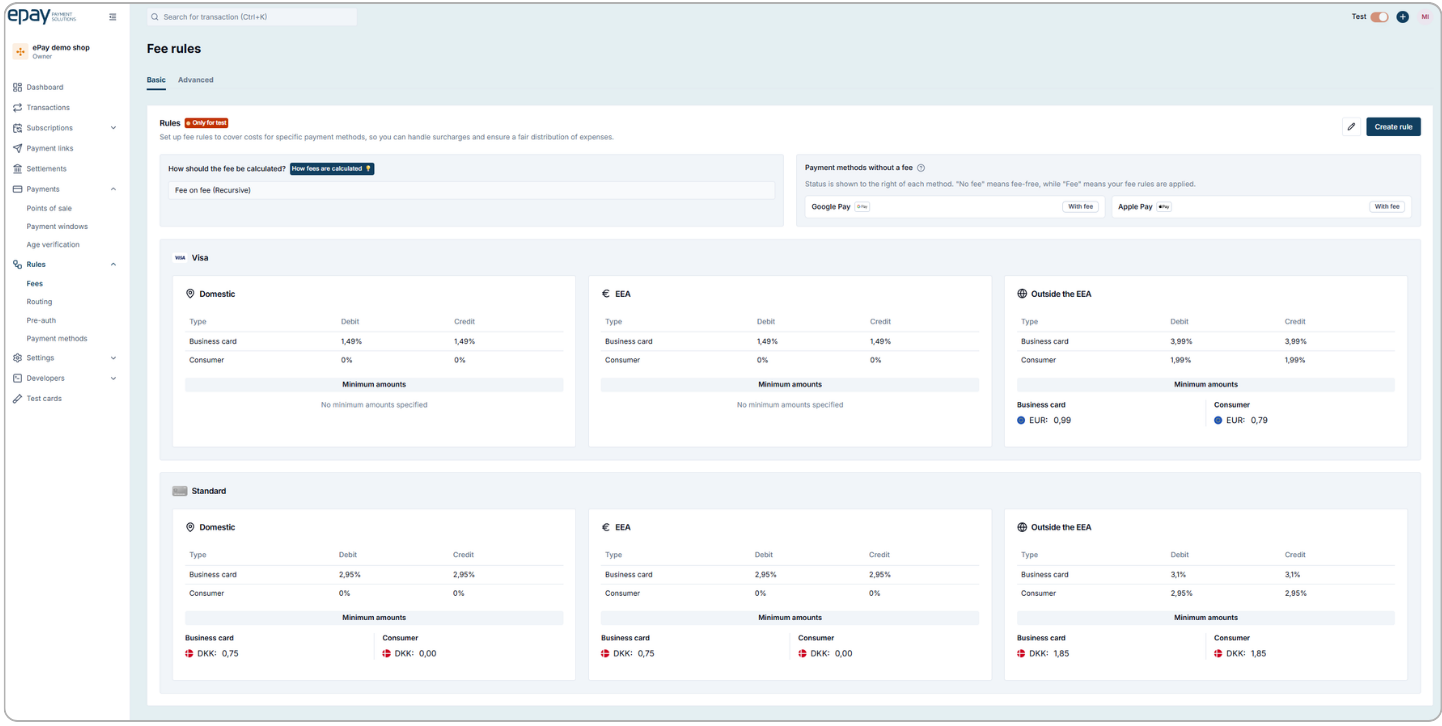
(In our back office, you can easily set up rules for individual card types and fees under the 'Payment' tab)