
ePay or your acquirer: who does what?


When a customer pays by card in your webshop, two companies are involved: ePay and your acquirer, for example Nets, Swedbank or Worldline. We each have our own jobs, and once you know who does what, you also know who to contact when something needs looking into or changing.
How it fits together
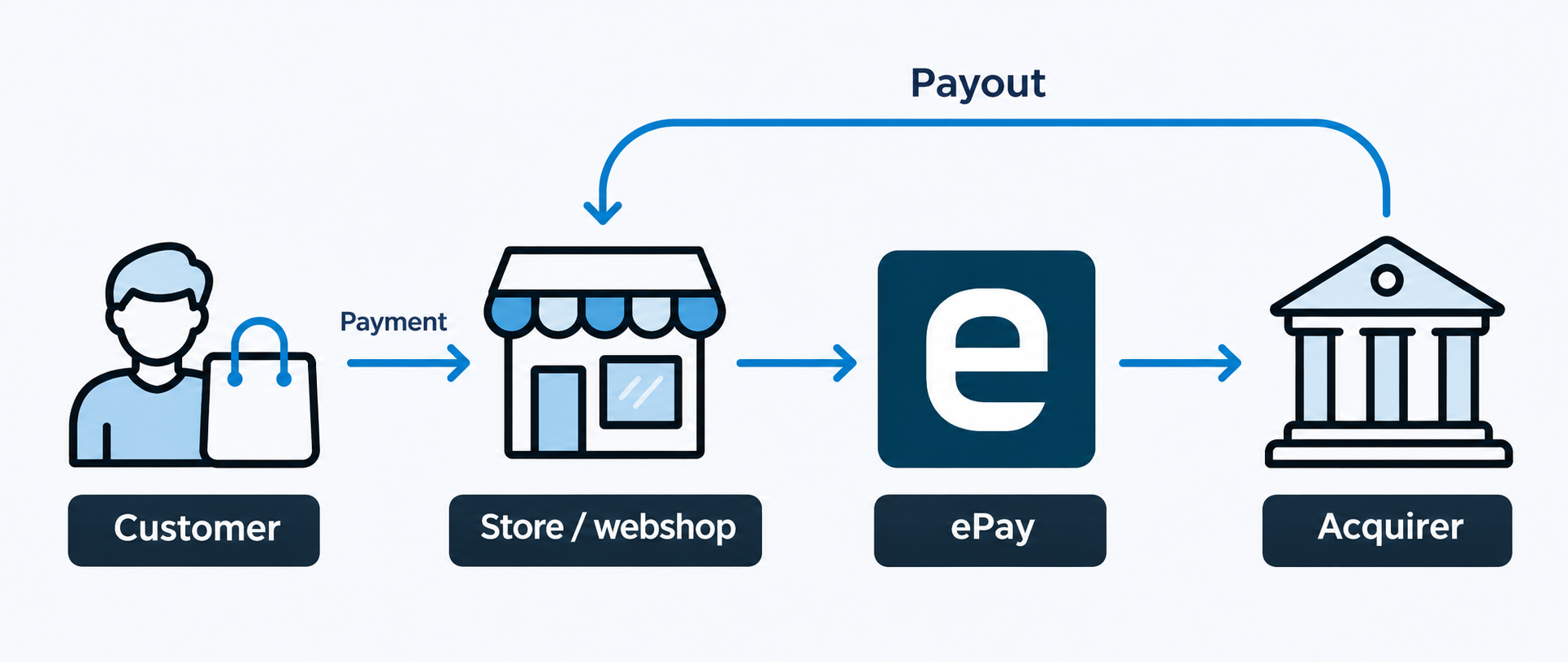
Your customer pays in ePay's payment window, and ePay passes the payment on to the acquirer. The acquirer makes sure the amount is charged to the customer's card and pays the money out to your bank account.
What ePay takes care of
- The payment window: what your customers see when they pay. It's ePay's, even if your acquirer is Nets, for example.
- The connection to your webshop: plugins for platforms such as WooCommerce and Shopify, or an integration through our API.
- Backoffice: this is where you see your payments and capture, refund and cancel them, and where you set up payment links, subscriptions and rules.
- Payment methods: as well as cards, you can offer other methods through ePay, such as the mobile wallets MobilePay and Swish, or ViaBill for buy now, pay later.
- Technical support: from login and setup to payments that fail in checkout. The exception is when the fault lies with the acquirer, for example if a refund is declined. Then it's the acquirer who has to resolve it, but we're happy to help you work out where the problem is.
What your acquirer takes care of
- The acquiring agreement: the acquirer approves your business to accept card payments. We're happy to help you with the application, but it's the acquirer who says yes.
- Payouts: the acquirer collects the amounts from your card payments and pays them out to your bank account, usually several payments at a time.
- Settlement: the overview of what has been paid out, and what has been deducted in fees, comes from the acquirer. For selected acquirers, we bring the settlements together in one common format in Backoffice, so you can see them in the same place as your payments.
- The fees on your card payments: the transaction fees are set out in your agreement with the acquirer.
You can have more than one acquirer. If you accept Dankort, the Danish national debit card, that agreement is with Nets, while Visa and Mastercard can be with a different acquirer, such as Worldline.
Payment methods such as ViaBill have their own agreement and make their own payouts. Questions about payouts from them go to the provider.
Who should you contact?
Contact ePay when
- a payment fails in checkout, or the payment window isn't working
- you can't log in to Backoffice
- the plugin or integration with your webshop is giving you trouble
- you want to offer more payment methods
- you have questions about your invoice from ePay
Contact your acquirer when
- a payout is missing or doesn't add up
- you have questions about settlement or the fees on your card payments
- you need to change the account your money is paid out to, unless your acquirer is Shift4, in which case you contact ePay
Is a payment showing as captured in Backoffice, but you can't find it in your bank account? Captured means the payment has been sent to the acquirer. The acquirer can pay it out, bundled together with your other payments, so you can't always match the amount one-to-one on your bank statement.
Changing the account for your payouts
If you change banks, the account has to be changed with your acquirer, not with ePay, unless your acquirer is Shift4. Your webshop keeps taking payments as normal while you switch, but don't close the old account until the first payout has landed in the new one.
- Nets: you change the account yourself in MyNets under Sales location. If you have both Dankort and international cards with Nets, those are two separate agreements, and the account has to be changed on both. See Nets' guide.
- Worldline (formerly Bambora): fill in Worldline's account change form (in Danish) and send it to support.nordics@worldline.com, together with a statement from your bank confirming the account and a copy of ID for the person signing.
- Clearhaus: email support@clearhaus.com with your company name, CVR number (your Danish company registration number), your merchant ID and the reason for the change, for example that you've moved to a new bank. Include the new IBAN and SWIFT as well, plus a screenshot from your online banking showing the IBAN and the company name in the same image.
- Elavon: Elavon needs written notice 30 days before you change account, and the change has to be approved by them, so start in good time. Email kundeservice.dk@elavon.com or call +45 38 48 74 88.
- Swedbank: email Swedbank's card acquiring support at support@swedbankpay.dk, or call +45 88 62 40 02. Swedbank needs a completed change form, so ask them for one.
- Shift4: this is where you contact us. Email support@epay.dk. Among other things, we'll need the IBAN and SWIFT for the new account, confirmation of the account from your bank, and your company name and CVR number.
Have your merchant number ready. It's your number with the acquirer. Worldline calls it a customer number, and Clearhaus and Elavon call it a merchant ID. If you don't know it, email us and we'll find it for you.
ViaBill and MobilePay
ViaBill and MobilePay ePayments make their own payouts, separately from the acquirer, so here you change the account directly with the provider.
- ViaBill: email support@viabill.com.
- MobilePay ePayments: you change the account yourself in the Vipps MobilePay business portal. You need to be logged in with MitID, the Danish national eID, to change the account.
If you have the older MobilePay solution, where the payment runs on the card behind the app, the money comes from your acquirer, so follow the instructions for your acquirer above. If you're not sure which solution you have, email us.
Need help?
If you're unsure who to contact, email support@epay.dk or call +45 9813 9040, and we'll point you in the right direction.


