
Adaptive Payment Methods: How It Works


It's 9.47 pm on a Friday. Your customer is sitting with a cup of coffee and their laptop open in front of them. The basket is full. They click "Proceed to payment", choose to pay by card, and...
Error.
They try again. Error. And once more, just to be sure. Error.
There's nothing wrong with your online shop. The card acquirer is having operational issues. But your customer doesn't know that. All they know is that it isn't working. And it takes them exactly four seconds to close the tab and find another shop.
That order isn't coming back. That's the kind of scenario Adaptive Payment Methods is built to prevent.
How it works
ePay continuously monitors every active payment method. If the system detects a problem with one of them, Adaptive Payment Methods reacts automatically.
If a card acquirer runs into operational issues, for example, the card payment option drops to the bottom of the list with a visible label. A short message about the problem appears at the top, and the payment methods that are still working move up to the top of the payment window.

The point isn't just to avoid an error message. It's to remove the half-second where the customer thinks "something's wrong with this shop" and closes the tab. Adaptive Payment Methods shows working alternatives before the customer has time to leave.
There's nothing you need to do
The feature is active for all ePay customers, on our new platform. No setup, no configuration, nothing to switch on. The payment window handles it on its own, in the background, whenever it's relevant.
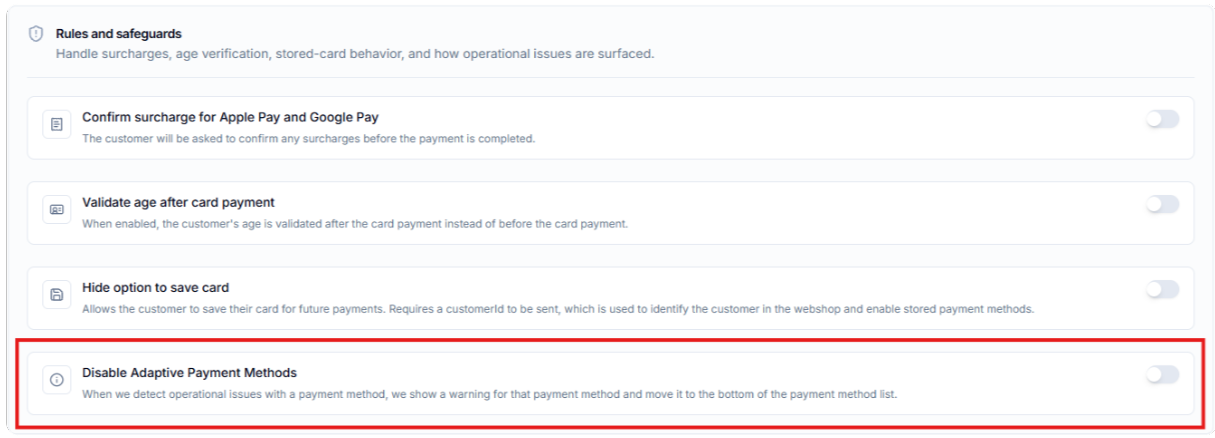
Would you rather control it yourself? You can turn the feature off in your ePay Backoffice under Payments > Payment windows > Flow
Is it available on your platform?
Adaptive Payment Methods is available on ePay's new platform. Not sure which platform you're on, or want to switch? Get in touch and we'll help you get started: https://epay.eu/contact


